
Connecting the Vendor Dashboard to Entra ID
By Javier Hack · Published: 2026-06-04 · 8 min read
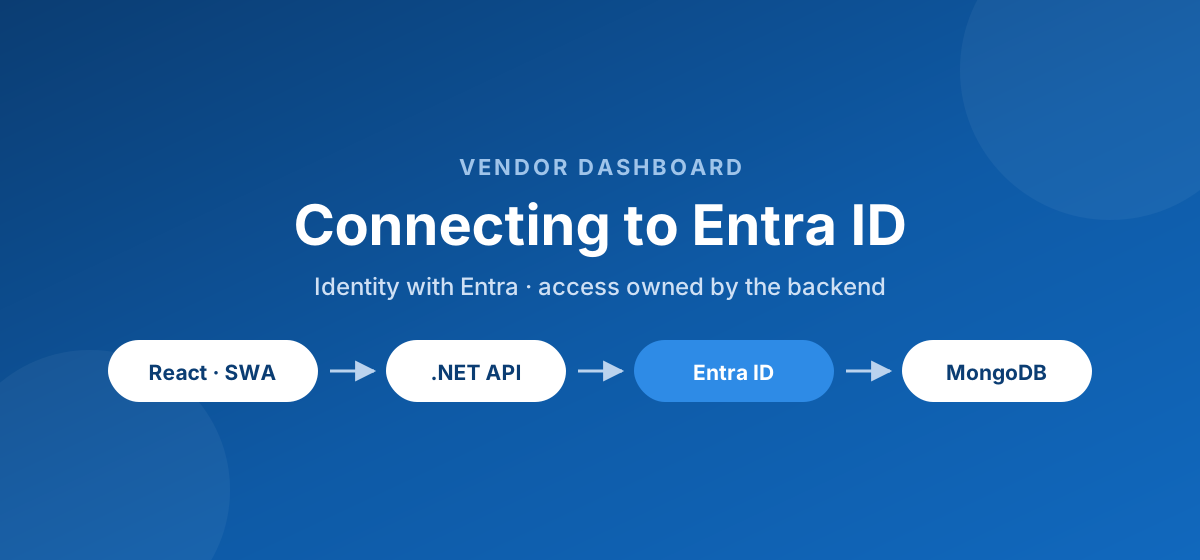
What we built
I recently wired login into the Vendor Dashboard, so I wanted to write down how it works. The short version: the app connects to Microsoft Entra External ID for authentication, but the decision of which vendor a user can actually see stays inside the backend. Entra answers “who is this person”, and the API answers “what are they allowed to touch”.
The pieces and how they live in Azure
The dashboard is two deployed apps plus a managed identity provider. The frontend is a React single-page app hosted on Azure Static Web Apps. The backend is a C# ASP.NET Core Web API running in the same Azure ecosystem. And Entra External ID sits in front as the identity provider that issues the tokens.
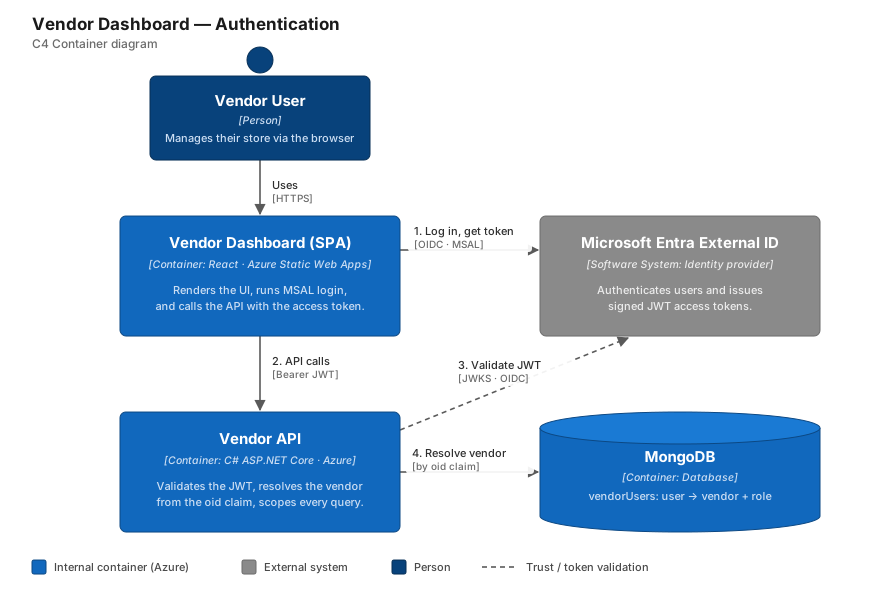
- React frontend on Azure Static Web Apps: handles the login redirect and stores the access token via MSAL.
- C# ASP.NET Core API in Azure: validates the token, resolves the vendor, and runs every protected endpoint.
- Entra External ID: the identity provider that authenticates the user and signs the JWT.
- MongoDB: stores the vendorUsers mapping that links an Entra user to a vendor and a role.
How the React app and the .NET API actually talk
On the frontend, login is a redirect to Entra. Once the user comes back, MSAL holds an access token for my API. From that point, every request to the .NET backend carries the token in the Authorization header. The frontend never sends a vendorId and never trusts itself for access decisions, it just forwards the token.
// React side: attach the Entra access token to every API call
const { accessToken } = await msalInstance.acquireTokenSilent({
  scopes: ['api://shift-vendor-api/.default'],
  account,
});

await fetch(`${API_BASE_URL}/vendor/orders`, {
  headers: { Authorization: `Bearer ${accessToken}` },
});
On the backend, ASP.NET Core does the JWT validation for me. I point the JWT bearer middleware at the Entra authority and audience, and it rejects anything that is expired, has the wrong audience, or is not signed by Entra before my controllers ever run.
// Program.cs - the .NET API trusts tokens issued by Entra
builder.Services
    .AddAuthentication(JwtBearerDefaults.AuthenticationScheme)
    .AddJwtBearer(options =>
    {
        options.Authority = builder.Configuration["Entra:Authority"];
        options.Audience = builder.Configuration["Entra:Audience"];
    });

builder.Services.AddAuthorization();
The one piece that always needs attention with Static Web Apps plus a separate API is CORS. The Static Web Apps domain has to be an allowed origin on the .NET side, otherwise the browser blocks the call before the token even matters.
Other approaches I considered
Before reaching for Entra, I looked at a few other options, because adding a full identity provider is not a small decision.
- Rolling my own auth: email plus password, hashing, sessions or my own JWTs. Total control, but I would own password resets, lockouts, token rotation and every security mistake that comes with it.
- A third-party provider like Auth0: great developer experience, but another vendor and bill outside the Azure ecosystem the rest of the stack already lives in.
- Putting the vendorId straight into the token claims: tempting, but then every access change means touching identity config, and the frontend gets to see authorization data it should not care about.
Why I went with Entra ID
The deciding factor was that the rest of the platform already lives in Azure. Using Entra External ID meant identity sat next to the API and the hosting, with one bill, one portal, and first-class support in ASP.NET Core through the Microsoft.Identity libraries. I get login, MFA, password resets and token signing as a managed service instead of code I have to babysit.
Letting Entra own identity meant not being responsible for storing passwords, and more time spent on the actual product instead of reinventing auth.
— Design note on choosing Entra
Keeping identity separate from vendor access
Here is the design choice I care most about: Entra tells me who the user is, but it does not decide which vendor they belong to. I keep that mapping in a vendorUsers collection in MongoDB. When a request hits the API, I read the Entra Object ID (the oid claim) from the validated token, look up the active vendor relationship, and scope every query from there. The frontend never gets a say in it.
// Resolve the vendor from the Entra Object ID, never from the request body
var objectId = User.FindFirstValue("oid");

var link = await _vendorUsers
    .Find(u => u.ObjectId == objectId && u.Status == "active")
    .FirstOrDefaultAsync();

if (link is null)
    return Forbid(); // authenticated, but not linked to any vendor

var vendorId = link.VendorId; // every query below is scoped to this
This is what keeps the MVP safe. Because the vendorId is derived on the server from a token the user cannot forge, there is no request a user can edit to reach another vendor's data.
Tradeoffs I am living with
I like that this model is easy to reason about, fast to ship, and flexible enough to support multiple users, roles, and even multiple vendors per user later. The honest tradeoff is that onboarding is still manual: right now I create the Entra user and then add the vendorUsers record by hand, so there is room for human error until I automate it.
What I want to improve next
My next steps are automating invitations, building a small internal admin screen to manage vendor users, and adding audit logs for role changes and disabled accounts. The reassuring part is that none of that touches the core architecture: Entra stays focused on identity, and my .NET API stays in charge of platform access.