
Building ShiftGreenBot: a RAG Product Finder
By Javier Hack · Published: 2026-06-04 · 11 min read
What I set out to build
I built ShiftGreenBot to make product discovery feel like a conversation. Instead of guessing the exact keywords the catalogue expects, a shopper can just describe what they need: “I have dry skin”, “I need a sustainable water bottle”, or “something eco-friendly for my baby”. The bot turns that into a real product search and answers with options that actually exist in the marketplace.
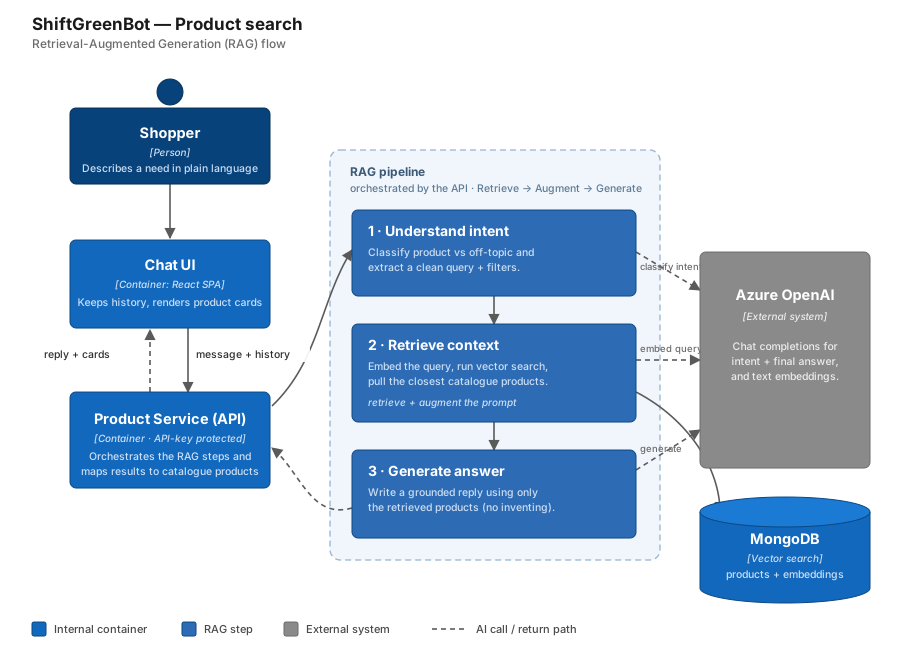
The trick to keeping it honest is RAG: the model never recommends from imagination, it recommends from products I retrieved first. Here is the whole flow before I break it down.
The chat experience and the handoff
The chat is a client-side React experience. It keeps the conversation history in the browser, styles user and bot messages differently, shows a loading state while it waits, and renders product cards when the bot recommends items. What it does not do is talk to Azure OpenAI or MongoDB directly. It only sends the current message plus the history to my backend, which keeps the browser simple and hides the implementation details.
That backend route is protected with an API key, so the chatbot is not an open endpoint anyone can hammer. The frontend sends the credentials, the backend validates the request, and only then does the RAG flow start.
Step 1: understand the intent before searching
My first instinct was to search products immediately, but I learned that searching the raw user message gives messy results. So the first step does not search at all: it asks Azure OpenAI to classify the message. The model decides whether this is a product search or something off-topic, and if it is a search, it extracts a clean semantic query plus useful filters like preferences, constraints, or rejected categories.
This extra step is what keeps the bot controlled. If someone asks something unrelated, I can redirect them politely instead of firing a random query at the database, and the search itself runs on a cleaned-up query rather than a rambling sentence.
Why vector search instead of keyword search
MongoDB has had full-text search for years. You create a text index on a field, run a $text query, and it returns products whose description contains any of the words you typed. It is fast, simple to set up, and works well when the user speaks the same vocabulary as the catalogue.
// What keyword search looks like in MongoDB
const products = await catalogue.find({
  $text: { $search: “sustainable water bottle” }
}).limit(6).toArray();
The problem shows up fast when you try it with real conversational input. If a shopper types “I need something eco-friendly for staying hydrated on the go”, keyword search looks for products literally containing “eco-friendly”, “hydrated”, or “go”. A product described as “sustainable reusable bottle” matches nothing, because those exact words are not in the query. Change the language, use a synonym, or describe a feeling instead of a spec, and keyword search comes back empty.
Vector search changes the question entirely. Instead of asking “does this document contain these words?”, it asks “is this document semantically close to what the user meant?”. Both the product descriptions and the user query are converted to embeddings: vectors in a high-dimensional space. The search returns whatever is geometrically nearest. A “reusable bottle” ends up close to “eco-friendly hydration” in that space because the model learned from enough language to know they live in the same neighborhood of meaning.
- Keyword search: fast, exact, brittle. Breaks whenever the user and the catalogue use different words for the same thing.
- Vector search: slightly slower, approximate, resilient. Works when the user describes what they need in their own words, with synonyms, vague phrasing, or a different language.
- For a conversational product finder, the user is never going to type catalogue keywords. Vector search is the right fit.
The shift from keyword to vector search is a shift from “did you use the right word?” to “did you mean something like this?”. That is the experience a conversational bot needs to feel useful.
Step 2: retrieve real products with vector search
This is the “retrieval” in RAG, and the step where the keyword vs. vector decision plays out. I take the clean query extracted in step one, convert it to an embedding with Azure OpenAI, then run MongoDB vector search against the product embedding field to pull the closest semantic matches. The result is a small, relevant set of real catalogue products that the model is allowed to use.
// Retrieve: embed the query, then vector search the catalogue
const queryVector = await embed(extracted.query);

const products = await catalogue.aggregate([
  {
    $vectorSearch: {
      index: "product_embeddings",
      path: "embedding",
      queryVector,
      numCandidates: 200,
      limit: 6,
    },
  },
]).toArray();
For this to work, every product needs an embedding ahead of time. I build a text representation from the title, brand, type, description, and collections, send it to Azure OpenAI, and store the vector in MongoDB. A batch job only embeds products that do not have a vector yet, processing them in small groups with pauses in between so I do not hit Azure OpenAI rate limits.
Step 3: generate a grounded answer
Now Azure OpenAI is used a second time, but not to search, to write the reply. I give it strict instructions: answer only the last user message, use only the products I retrieved, never invent products, do not repeat names, and do exactly one thing, either ask a single clarifying question or recommend products, never both at once.
The model can only recommend products that came back from vector search. The backend maps the recommended names to real product objects before they reach the UI, so every card is grounded in catalogue data.
— Design rule that keeps recommendations honest
Why I split it into three calls
I deliberately avoided a single do-everything AI call. Splitting intent detection, retrieval, and generation gives each layer a clear job and makes the whole thing easier to control and debug.
- Chat UI: owns the conversation and renders product cards.
- API: validates the key and orchestrates the steps.
- Azure OpenAI: handles language understanding, embeddings, and the final reply.
- MongoDB: handles retrieval through vector similarity search.
The conversation history matters here too. I send previous messages and shown products back to the intent step, so when a shopper says “not that one” or “something cheaper”, the bot has enough context to avoid repeating itself.
Tradeoffs I am aware of
The biggest dependency is data quality: the recommendation is only as good as the embeddings and product descriptions behind it, so thin or messy product data weakens the results. There is also latency: unlike a plain keyword lookup that only hits the database, a single turn here can involve embedding the query with Azure OpenAI plus the vector search, which adds round trips that a $text query would skip entirely. And filtering is still mostly language-driven rather than enforced at the database level. These are real costs, but they are the price of the semantic flexibility that keyword search cannot give.
How I prototyped it: local Ollama first
Before any of this ran on Azure, I built and tested the whole flow locally with Ollama. Running the models on my own machine let me iterate on prompts, the RAG flow, and the vector search without worrying about cloud cost or rate limits. I used Gemma as the conversational model for intent detection and the final reply, and a separate local embedding model to turn product text and user queries into vectors.
Once the design held up locally, I migrated to Azure OpenAI for the conversational and embedding models. Because I had kept the model calls behind a thin abstraction, the swap was mostly a configuration change: the RAG flow, the MongoDB vector search, and the API contract stayed exactly the same. Prototyping locally and deploying to managed models gave me the best of both worlds: fast, free iteration early on, and scalable, production-grade inference later.
Where I want to take it next
My next step is hybrid search: combining vector similarity with structured filters like price, type, brand, availability, or sustainability attributes. I also want richer cards with product URLs and images so the chat becomes a direct path to buying, and anonymised search analytics to learn what people ask for and where the catalogue has gaps. The foundation is already there: natural language in, catalogue-grounded recommendations out.